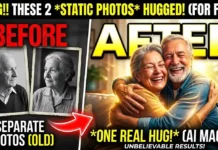
Do you have an old black and white photo of your grandparents that is torn, faded, or blurry? Maybe it lives inside an old album and every year it loses a little more detail. Many people think these photos are gone forever, but that is no longer true.
Aksar humari purani photos kharab hone lagti hain, colors fade ho jate hain aur faces blur ho jate hain. The good news is that today you can restore them using AI tools without learning Photoshop or complicated editing skills.

This guide will show you how to restore old photos AI style, step by step. Just a few simple actions can turn damaged memories into clear, digital images you can save forever.
Step 1: Photo Digitize Kaise Karein (The Setup)
Before AI can fix your image, you first need a clean digital copy. Many people make a mistake here by clicking a quick photo with the camera and getting reflections or shadows.
The better method is using the Google PhotoScan app. It is designed to scan physical photos and reduce glare automatically.
How to scan correctly
- Place the photo on a flat surface with good light.
- Open Google PhotoScan.
- Move your phone as the app guides you.
- Let the app combine multiple angles into one clear scan.
This step is important because cleaner input means better AI output. If your original scan is blurry, AI results will also be weak.


Step 2: AI Tool Mein Upload Karein (The Action)
Now comes the fun part. You will use AI to sharpen details and increase resolution.
Two easy options are:
Upscayl runs locally on your computer and allows you to enhance images up to higher resolutions with multiple models. The desktop version is free and processes images on your local machine.
Remini is popular because it works with one tap and focuses heavily on facial enhancement and blur removal. It is designed to improve low-quality photos quickly.
Basic process (same for most apps)
- Open the app.
- Select your scanned photo.
- Tap Enhance or choose upscale.
- Wait for AI processing.
- Save the HD result.
If you are confused about which tool to choose, check our guide: [11 Best Free AI Upscalers] for detailed comparisons and recommendations.
This step alone often solves the problem people search as blur photo ko saaf kaise kare or fix blurry pictures android.
Step 3: Black & White Photo Mein Color Kaise Bharein
Many family photos from the 1970s or earlier are black and white. AI can now add realistic colors automatically.
Tools like Palette.fm use AI filters to colorize old images with surprisingly natural results. You upload a photo, choose a style, and the tool applies color in seconds.
Easy colorization workflow
- Upload restored photo.
- Pick a color style.
- Preview different options.
- Download the version you like.
The goal is not perfect historical accuracy but emotional connection. Seeing old faces in color makes memories feel alive again.
Step 4: Scratches Aur Cracks Remove Karein (Advanced)
Old paper photos often have lines, dust, or scratches. This is where specialized AI restoration helps.
Hotpot.ai offers an AI picture restorer that automatically removes scratches, sharpens colors, and improves faces. It works for both color and black and white photos.
Quick method
- Upload photo.
- Select scratch removal option.
- Let AI repair damaged areas.
- Download restored file.
Important: AI can repair light to medium damage very well, but extremely torn photos may still require manual editing.
Step 5: Before vs After (What Actually Changes)
After restoration, the difference is usually dramatic:
- Faces become clearer
- Eyes and hair details appear sharper
- Noise and grain reduce
- Colors look natural instead of faded
- Overall image looks newer and cleaner
In many cases, a small 2 MB scan becomes sharp enough for prints or digital albums.


Common Mistakes to Avoid
Many beginners get poor results because of small errors. Keep these points in mind:
- Do not scan in low light.
- Avoid taking angled photos.
- Do not over-enhance multiple times.
- Keep a copy of the original image.
- Start with moderate enhancement first.
If you follow these basics, even old photo restoration online free tools can give excellent results.
Pro Tips from a Photo Restoration Expert
Use the highest quality scan possible
AI creates detail, but it still needs a clean starting point.
Faces improve the most
Portraits usually show the biggest difference because modern AI models are trained heavily on facial data.
Save two versions
One natural looking and one enhanced. Sometimes the less edited version feels more authentic.
Backup your memories
After restoration, store them in cloud storage and on a hard drive.
Why AI Restoration Feels Emotional
People usually start this process thinking they are just fixing an image. But the moment a blurry face becomes clear, it feels personal.
A photo that looked damaged suddenly feels alive again. This is why searches like purani photo ko new kaise kare are growing rapidly. People want to reconnect with memories, not just edit images.
Conclusion
Your old photos are more than paper. They are history.
You do not need expensive software or editing skills anymore. With simple AI tools, you can scan, enhance, colorize, and restore damaged photos in minutes.
Do not wait until the photo fades further. Digitize and restore your memories today.
FAQs
Q1: Blur photo ko saaf kaise kare online?
You can use online tools like Zyro style upscalers or desktop options like Upscayl. Upload your image, choose enhancement, and download the HD result.
Q2: Is there a free alternative to Remini?
Yes. Several free tools are available. Check our detailed [Best Apps List] to find options based on PC or mobile use.
Q3: Can AI fix torn photos?
Yes, partially. AI tools can remove scratches and repair missing areas to some extent, but heavily damaged photos may still need manual editing.
Final Thought
Technology changes fast, but memories do not. Restoring one old photo today can preserve a story for the next generation. Start with one image and you will be surprised how much detail AI can bring back.