Home Blog Page 3

Viral Tango Fire Dance Video Prompt 2026 (Copy Paste) GGVP44

0

If you have seen the trending “Tango Fire Dance” videos on Instagram Reels or YouTube Shorts and want to create a similar video for your own channel, then you are in exactly the right place!

These days, it is the era of Text-to-Video AI. There are many powerful AI video generators available in the market right now like Seedance 2.0, Kling 3.0, Runway ML, Google Veo 3, LTX 2.5, and Vidu AI—that can create cinematic videos just from the text you type. By using these tools, you can create amazing content for your faceless channel or meme page.

However, to make this specific viral video, we will use the best free AI tool: Seedance 2.0. Copy the prompt given below and generate your own viral video!

How to Generate the Video (Step-by-Step)

1. Go to the Website: First, visit
OpenArt.ai (Free AI Video Generator)
and sign in for free using your Google account. OpenArt mein Seedance 2.0, Kling 3.0, or
Google Veo 3 — Its free.

Select Text-to-Video: On the dashboard, click on the ‘Create’ or ‘Text to Video’ option.

Paste the Prompt: Copy the prompt provided below and paste it into the prompt box. (Note: You can change the colors or characters in the prompt if you want).

Choose Aspect Ratio: If you are making the video for Instagram Reels or YouTube Shorts, select the 9:16 (Portrait) ratio. If it is for standard YouTube videos, keep it at 16:9 (Landscape).

Generate: Click the ‘Generate’ button and wait 1-2 minutes. Your high-quality AI video is now ready to download!

The Copy-Paste Prompt

⭐ GADGET GYANI RECOMMENDED TOOL

🎬 OpenArt.ai — Free AI Video & Image Generator

To create this video, we’ll be using OpenArt.ai — an all-in-one AI creator studio where top models like Seedance 2.0, Kling 3.0, and Google Veo 3 are all available in one place, completely FREE! Text-to-Video, Image Generation, Lip-Sync, Motion Sync — everything you need is right here.

🚀 Try OpenArt.ai for Free →

✅ No Credit Card Required  |  ✅ Instant Sign-up with Google Account

(Copy the exact text below)

1. Upload the reference choreography sheet
2. Upload the tango couple’s image
3. Stream the choreography with a single prompt

9-step tango plan ➜ seamless romantic dance video

Invitation → Hand connection → Elegant turn → Final dip pose

Prompt:
Create a seamless 15-second tango choreography video using two uploaded reference images.

REFERENCE IMAGE 1:
Use the tango choreography sheet only for movement order, dance structure, and body-action logic. Do not recreate the sheet, text, arrows, numbers, borders, or panel layout.

REFERENCE IMAGE 2:
Use this woman and man as the main tango couple. The woman must match the reference: long straight black hair, blue eyes, slim elegant body, glamorous red tango dress with a thigh slit, red high-heel sandals, and refined feminine studio style. The man must match the reference: handsome, dark styled hair, fitted black shirt, black trousers, black dress shoes, elegant masculine tango presence. Keep their faces, hairstyles, outfits, body proportions, and romantic tension consistent throughout the entire video.

MAIN ACTION:
The couple performs one seamless tango flow: the man extends his hand and invites the woman to dance, she accepts and steps closer, they form a classic tango frame, glide into a smooth forward walk, shift into a controlled side step, rotate through a small pivot turn, move into an ocho setup, complete a graceful ocho, and finish with a dramatic elegant dip pose, maintaining romantic tension and continuous body connection throughout.

Gadget Gyani Pro Tip (For This Video)

To make this video look even more realistic, add extra details to the prompt like a “white background” “real skin texture” “wind” and “shoes with mud on the upper.”

For the background music, make sure to use trending Phonk or Lo-Fi audio on Instagram. This will help push your video into algorithm


Viral Celebrity Sighting Scenario Video Prompt 2026 (Copy Paste) GGVP43

0

If you have seen the trending “Celebrity Sighting Scenario” videos on Instagram Reels or YouTube Shorts and want to create a similar video for your own channel, then you are in exactly the right place!

These days, it is the era of Text-to-Video AI. There are many powerful AI video generators available in the market right now like Seedance 2.0, Kling 3.0, Runway ML, Google Veo 3, LTX 2.5, and Vidu AI—that can create cinematic videos just from the text you type. By using these tools, you can create amazing content for your faceless channel or meme page.

However, to make this specific viral video, we will use the best free AI tool: Seedance 2.0. Copy the prompt given below and generate your own viral video!

How to Generate the Video (Step-by-Step)

1. Go to the Website: First, visit
OpenArt.ai (Free AI Video Generator)
and sign in for free using your Google account. OpenArt mein Seedance 2.0, Kling 3.0, or
Google Veo 3 — Its free.

Select Text-to-Video: On the dashboard, click on the ‘Create’ or ‘Text to Video’ option.

Paste the Prompt: Copy the prompt provided below and paste it into the prompt box. (Note: You can change the colors or characters in the prompt if you want).

Choose Aspect Ratio: If you are making the video for Instagram Reels or YouTube Shorts, select the 9:16 (Portrait) ratio. If it is for standard YouTube videos, keep it at 16:9 (Landscape).

Generate: Click the ‘Generate’ button and wait 1-2 minutes. Your high-quality AI video is now ready to download!

The Copy-Paste Prompt

⭐ GADGET GYANI RECOMMENDED TOOL

🎬 OpenArt.ai — Free AI Video & Image Generator

To create this video, we’ll be using OpenArt.ai — an all-in-one AI creator studio where top models like Seedance 2.0, Kling 3.0, and Google Veo 3 are all available in one place, completely FREE! Text-to-Video, Image Generation, Lip-Sync, Motion Sync — everything you need is right here.

🚀 Try OpenArt.ai for Free →

✅ No Credit Card Required  |  ✅ Instant Sign-up with Google Account

(Copy the exact text below)

Unsteady handheld phone footage shot from [SHOOTER VANTAGE / SHOOTING POSITION] at [TIME OF DAY], [LENS/PHONE PHYSICAL POSITIONING DETAIL], producing [PRIMARY OPTICAL ARTIFACT, e.g. a faint smear of condensation fog, a smudge of fingerprint oil, a streak of rain] across the [FRAME LOCATION, e.g. lower quarter, right edge, top third] of the frame and intermittent [LIGHT FLARE TYPE, e.g. glare blooms, lens halation, prismatic streaks] from the [DOMINANT LIGHT SOURCE] reflecting back against the shooter’s phone camera, the image is flat, auto-white-balance toggling between [COLOR CAST 1, e.g. a cool blue cast] and [COLOR CAST 2, e.g. an orange-amber push] as [LIGHT MIXING SCENARIO, e.g. ambient street light mixes with interior glow], color entirely ungraded and slightly washed out.

Gadget Gyani Pro Tip (For This Video)

To make this video look even more realistic, add extra details to the prompt like a “sand on beach” “real skin texture” “wind” and “shoes with mud on the upper.”

For the background music, make sure to use trending Phonk or Lo-Fi audio on Instagram. This will help push your video into algorithm

Viral Dancing Girl Video Prompt 2026 (Copy Paste) GGVP42

0

If you have seen the trending “Dancing Girl” videos on Instagram Reels or YouTube Shorts and want to create a similar video for your own channel, then you are in exactly the right place!

These days, it is the era of Text-to-Video AI. There are many powerful AI video generators available in the market right now like Seedance 2.0, Kling 3.0, Runway ML, Google Veo 3, LTX 2.5, and Vidu AI—that can create cinematic videos just from the text you type. By using these tools, you can create amazing content for your faceless channel or meme page.

However, to make this specific viral video, we will use the best free AI tool: Seedance 2.0. Copy the prompt given below and generate your own viral video!

How to Generate the Video (Step-by-Step)

1. Go to the Website: First, visit
OpenArt.ai (Free AI Video Generator)
and sign in for free using your Google account. OpenArt mein Seedance 2.0, Kling 3.0, or
Google Veo 3 — Its free.

Select Text-to-Video: On the dashboard, click on the ‘Create’ or ‘Text to Video’ option.

Paste the Prompt: Copy the prompt provided below and paste it into the prompt box. (Note: You can change the colors or characters in the prompt if you want).

Choose Aspect Ratio: If you are making the video for Instagram Reels or YouTube Shorts, select the 9:16 (Portrait) ratio. If it is for standard YouTube videos, keep it at 16:9 (Landscape).

Generate: Click the ‘Generate’ button and wait 1-2 minutes. Your high-quality AI video is now ready to download!

The Copy-Paste Prompt

⭐ GADGET GYANI RECOMMENDED TOOL

🎬 OpenArt.ai — Free AI Video & Image Generator

To create this video, we’ll be using OpenArt.ai — an all-in-one AI creator studio where top models like Seedance 2.0, Kling 3.0, and Google Veo 3 are all available in one place, completely FREE! Text-to-Video, Image Generation, Lip-Sync, Motion Sync — everything you need is right here.

🚀 Try OpenArt.ai for Free →

✅ No Credit Card Required  |  ✅ Instant Sign-up with Google Account

(Copy the exact text below)

Prompt:

Here’s every step with the text under each heading:

1. Basic Stance

Stand with your feet shoulder-width apart.
Relax your knees.
Keep your upper body relaxed.
Get ready.

2. Step to the Right

Step to the right.
Move your body in the direction of the step.
Keep your knees soft.
Keep your gaze forward.

3. Step to the Left

Step to the left.
Move your body in the direction of the step.
Keep your knees soft.
Return to the starting position.

4. Two Steps

Take two steps in sequence.
Step to the right first.
Then step to the left.
Connect smoothly.

5. Body Wave
Start the wave from your chest.
Move through your ribs and hips.
Finish with your lower body.
Make the motion smooth like a wave.

6. Hip Sway
Move your hips side to side.
Shift your weight with the motion.
Use your body naturally.
Keep your upper body relaxed.

7. Arm Swing
Swing your arms wide.
Step to beat with your feet.
Coordinate your arms and steps.
Return your arms to center.

8. Turn Preparation
Prepare for a turn in place.
Cross one foot over the other.
Use your core to maintain balance.
Spot in the direction of the turn.

9. Right Turn
Turn to the right.
Keep your core engaged.
Pivot on the ball of your foot.
Spot forward after the turn.

10. Left Turn
Turn to the left.
Keep your core engaged.
Pivot quickly.
Keep your posture upright.

11. Jump Up
Bend your knees and jump up.
Reach your arms overhead.
Land softly on your feet.
Connect to the next move.

12. Kick Pose
Kick your leg forward.
Keep your supporting leg stable.
Engage your core for balance.
Control your landing.

13. Side Lunge
Step wide to one side.
Bend one knee and lower your body.
Keep the other leg straight.
Show the direction of your strength.

14. Freeze Pose
Hit a strong pose on the beat.
Freeze your body momentarily.
Create a powerful shape.
Show your presence.

15. Finishing Pose
Finish the dance gracefully.
Keep your balance.
Show your confidence.
End with a clean, sharp pose.

16. Whole Flow
Connect from the basic stance to the finishing pose.
The steps, waves, and turns flow naturally together.
Express your own style.

Gadget Gyani Pro Tip (For This Video)

To make this video look even more realistic, add extra details to the prompt like a “sand on beach” “real skin texture” “wind” and “shoes with mud on the upper.”

For the background music, make sure to use trending Phonk or Lo-Fi audio on Instagram. This will help push your video into algorithm.

Viral Fashion Story Telling Video Prompt 2026 (Copy Paste) GGVP41

0

If you have seen the trending “Fashion Story Telling” videos on Instagram Reels or YouTube Shorts and want to create a similar video for your own channel, then you are in exactly the right place!

These days, it is the era of Text-to-Video AI. There are many powerful AI video generators available in the market right now like Seedance 2.0, Kling 3.0, Runway ML, Google Veo 3, LTX 2.5, and Vidu AI—that can create cinematic videos just from the text you type. By using these tools, you can create amazing content for your faceless channel or meme page.

However, to make this specific viral video, we will use the best free AI tool: Seedance 2.0. Copy the prompt given below and generate your own viral video!

How to Generate the Video (Step-by-Step)

1. Go to the Website: First, visit
OpenArt.ai (Free AI Video Generator)
and sign in for free using your Google account. OpenArt mein Seedance 2.0, Kling 3.0, or
Google Veo 3 — Its free.

Select Text-to-Video: On the dashboard, click on the ‘Create’ or ‘Text to Video’ option.

Paste the Prompt: Copy the prompt provided below and paste it into the prompt box. (Note: You can change the colors or characters in the prompt if you want).

Choose Aspect Ratio: If you are making the video for Instagram Reels or YouTube Shorts, select the 9:16 (Portrait) ratio. If it is for standard YouTube videos, keep it at 16:9 (Landscape).

Generate: Click the ‘Generate’ button and wait 1-2 minutes. Your high-quality AI video is now ready to download!

The Copy-Paste Prompt

⭐ GADGET GYANI RECOMMENDED TOOL

🎬 OpenArt.ai — Free AI Video & Image Generator

To create this video, we’ll be using OpenArt.ai — an all-in-one AI creator studio where top models like Seedance 2.0, Kling 3.0, and Google Veo 3 are all available in one place, completely FREE! Text-to-Video, Image Generation, Lip-Sync, Motion Sync — everything you need is right here.

🚀 Try OpenArt.ai for Free →

✅ No Credit Card Required  |  ✅ Instant Sign-up with Google Account

(Copy the exact text below)

Prompt:

Use uploaded reference image as the exact identity source. Keep the same man in every single scene with identical face, same skin tone, same facial structure, same hairstyle, same eyes, same jawline, same body proportions, no face change, no identity drift at all. Ultra-realistic cinematic travel transformation video, 15 seconds total, smooth walking transitions while changing across 10 different countries. The man keeps walking forward confidently and the environment transforms around him into different countries one by one. In every country, his outfit changes according to the local fashion and vibe while keeping him stylish, premium, and cinematic.

Scene flow:

1. Paris, France — elegant black trench coat, luxury street, Eiffel Tower background
2. Dubai, UAE — rich white luxury outfit, Burj Khalifa skyline, golden sunlight
3. Tokyo, Japan — modern stylish streetwear, neon city lights, Shibuya crossing
4. New York, USA — sharp blazer and sunglasses, Times Square cinematic light
5. London, UK — classy formal coat, rainy street, luxury British aesthetic
6. Rome, Italy — fashionable casual luxury outfit, old architecture, warm sunlight
7. Istanbul, Turkey — stylish cultural fusion outfit, historic streets, cinematic depth
8. Bangkok, Thailand — trendy modern fashion, vibrant luxury street market lights
9. Sydney, Australia — relaxed premium beachwear, Opera House background
10. Switzerland — luxury winter outfit, snowy mountains, rich cinematic ending

Camera style: smooth cinematic tracking shot, slow motion walking, dramatic luxury transitions, realistic body movement, ultra-detailed face, strong facial consistency, premium Netflix-level cinematic production, realistic lighting, depth of field, natural shadows, 8K quality, highly detailed textures, fashion editorial look, smooth transitions between countries, luxury lifestyle aesthetic, viral Instagram reel style, realistic environment transformation, powerful confident expression, cinematic ending shot.

Gadget Gyani Pro Tip (For This Video)

To make this video look even more realistic, add extra details to the prompt like a “sand on beach” “real skin texture” “wind” and “shoes with mud on the upper.”

For the background music, make sure to use trending Phonk or Lo-Fi audio on Instagram. This will help push your video into algorithm

Viral Roller Skating in the City Video Prompt 2026 (Copy Paste) GGVP40

0

If you have seen the trending “Roller Skating in the City” videos on Instagram Reels or YouTube Shorts and want to create a similar video for your own channel, then you are in exactly the right place!

These days, it is the era of Text-to-Video AI. There are many powerful AI video generators available in the market right now like Seedance 2.0, Kling 3.0, Runway ML, Google Veo 3, LTX 2.5, and Vidu AI—that can create cinematic videos just from the text you type. By using these tools, you can create amazing content for your faceless channel or meme page.

However, to make this specific viral video, we will use the best free AI tool: Seedance 2.0. Copy the prompt given below and generate your own viral video!

How to Generate the Video (Step-by-Step)

1. Go to the Website: First, visit
OpenArt.ai (Free AI Video Generator)
and sign in for free using your Google account. OpenArt mein Seedance 2.0, Kling 3.0, or
Google Veo 3 — Its free.

Select Text-to-Video: On the dashboard, click on the ‘Create’ or ‘Text to Video’ option.

Paste the Prompt: Copy the prompt provided below and paste it into the prompt box. (Note: You can change the colors or characters in the prompt if you want).

Choose Aspect Ratio: If you are making the video for Instagram Reels or YouTube Shorts, select the 9:16 (Portrait) ratio. If it is for standard YouTube videos, keep it at 16:9 (Landscape).

Generate: Click the ‘Generate’ button and wait 1-2 minutes. Your high-quality AI video is now ready to download!

The Copy-Paste Prompt

⭐ GADGET GYANI RECOMMENDED TOOL

🎬 OpenArt.ai — Free AI Video & Image Generator

To create this video, we’ll be using OpenArt.ai — an all-in-one AI creator studio where top models like Seedance 2.0, Kling 3.0, and Google Veo 3 are all available in one place, completely FREE! Text-to-Video, Image Generation, Lip-Sync, Motion Sync — everything you need is right here.

🚀 Try OpenArt.ai for Free →

✅ No Credit Card Required  |  ✅ Instant Sign-up with Google Account

(Copy the exact text below)

Prompt:

A high-intensity, ultra-realistic cinematic sequence of a fearless young woman roller skating at high speed through a crowded street in New York City during golden hour. Warm sunlight reflects off glass buildings and asphalt, casting long shadows and creating a glowing urban atmosphere.The camera tracks tightly alongside her in smooth, dynamic motion as she weaves through dense pedestrian traffic with precise control. Street vendors, food carts, cyclists, and passing taxis fill the environment, all reacting naturally as she speeds past. Fabric, hair, and loose objects respond to wind and motion, adding realism.She skillfully dodges obstacles—sliding past a bicycle, hopping over a low barrier, and carving sharply between people. When someone suddenly blocks her path, she forcefully pushes past to maintain momentum, without breaking flow. Every movement feels grounded, fast, and physically believable.Close-up inserts capture wheels scraping the pavement, sparks from brief friction, and her focused expression—breathing controlled, eyes locked forward. Motion blur is present but readable, emphasizing speed without losing clarity.Ambient city soundscape builds immersion: distant horns, chatter, footsteps, wheels rolling, wind rushing. The camera occasionally swings into wider angles to show scale, then snaps back into tight tracking shots to maintain http://intensity.Final moments: she bursts out of the crowded street into a slightly open stretch, accelerating even faster as the light flares behind her—ending on a powerful forward motion that feels loopable and http://adrenaline-driven.Style Notes:Ultra-realistic, action-movie quality, natural physics, no exaggerated or cartoon effects, cinematic lighting, shallow depth of field, handheld micro-movements, high-energy pacing, designed for a viral, immersive urban thrill.

Gadget Gyani Pro Tip (For This Video)

To make this video look even more realistic, add extra details to the prompt like a “people on the street” “real skin texture” “wind” and “shoes with mud on the upper.”

For the background music, make sure to use trending Phonk or Lo-Fi audio on Instagram. This will help push your video into algorithm

Viral Wind Vs Spirit Video Prompt 2026 (Copy Paste) GGVP39

0

If you have seen the trending “Wind Vs Spirit” videos on Instagram Reels or YouTube Shorts and want to create a similar video for your own channel, then you are in exactly the right place!

These days, it is the era of Text-to-Video AI. There are many powerful AI video generators available in the market right now like Seedance 2.0, Kling 3.0, Runway ML, Google Veo 3, LTX 2.5, and Vidu AI—that can create cinematic videos just from the text you type. By using these tools, you can create amazing content for your faceless channel or meme page.

However, to make this specific viral video, we will use the best free AI tool: Seedance 2.0. Copy the prompt given below and generate your own viral video!

How to Generate the Video (Step-by-Step)

1. Go to the Website: First, visit
OpenArt.ai (Free AI Video Generator)
and sign in for free using your Google account. OpenArt mein Seedance 2.0, Kling 3.0, or
Google Veo 3 — Its free.

Select Text-to-Video: On the dashboard, click on the ‘Create’ or ‘Text to Video’ option.

Paste the Prompt: Copy the prompt provided below and paste it into the prompt box. (Note: You can change the colors or characters in the prompt if you want).

Choose Aspect Ratio: If you are making the video for Instagram Reels or YouTube Shorts, select the 9:16 (Portrait) ratio. If it is for standard YouTube videos, keep it at 16:9 (Landscape).

Generate: Click the ‘Generate’ button and wait 1-2 minutes. Your high-quality AI video is now ready to download!

The Copy-Paste Prompt

⭐ GADGET GYANI RECOMMENDED TOOL

🎬 OpenArt.ai — Free AI Video & Image Generator

To create this video, we’ll be using OpenArt.ai — an all-in-one AI creator studio where top models like Seedance 2.0, Kling 3.0, and Google Veo 3 are all available in one place, completely FREE! Text-to-Video, Image Generation, Lip-Sync, Motion Sync — everything you need is right here.

🚀 Try OpenArt.ai for Free →

✅ No Credit Card Required  |  ✅ Instant Sign-up with Google Account

(Copy the exact text below)

Prompt:

A high-energy martial arts sequence set in a flooded bamboo forest during a heavy monsoon, featuring a lead character with consistent facial identity and sharp, focused expressions. She engages in a rapid exchange of blows with a semi-transparent humanoid spirit made of swirling wind and pressurized rain. The wind entity is invisible except for the debris, leaves, and rainwater it pulls into its form, appearing as a blurred, aggressive vortex in human shape. As the entity strikes, she deflects the blow, causing a circular shockwave that clears the rain for a split second. The camera uses dynamic 360-degree orbital shots, capturing mid-air collisions where her strikes create crystalline water splashes and the entity’s counter-strikes push her across the surface of the flooded floor. Ultra-realistic fluid dynamics, detailed rain textures, moody cinematic lighting, and droplets splashing onto the camera lens for a visceral, immersive feel.

Gadget Gyani Pro Tip (For This Video)

To make this video look even more realistic, add extra details to the prompt like a “Dark Look” “real skin texture” “wind” and “shoes with mud on the upper.”

For the background music, make sure to use trending Phonk or Lo-Fi audio on Instagram. This will help push your video into

Viral Dancing Girl Video Prompt 2026 (Copy Paste) GGVP38

0

If you have seen the trending “Dancing Girl” videos on Instagram Reels or YouTube Shorts and want to create a similar video for your own channel, then you are in exactly the right place!

These days, it is the era of Text-to-Video AI. There are many powerful AI video generators available in the market right now—like Seedance 2.0, Kling 3.0, Runway ML, Google Veo 3, LTX 2.5, and Vidu AI—that can create cinematic videos just from the text you type. By using these tools, you can create amazing content for your faceless channel or meme page.

However, to make this specific viral video, we will use the best free AI tool: Seedance 2.0. Copy the prompt given below and generate your own viral video!

How to Generate the Video (Step-by-Step)

1. Go to the Website: First, visit
OpenArt.ai (Free AI Video Generator)
and sign in for free using your Google account. OpenArt mein Seedance 2.0, Kling 3.0, or
Google Veo 3 — Its free.

Select Text-to-Video: On the dashboard, click on the ‘Create’ or ‘Text to Video’ option.

Paste the Prompt: Copy the prompt provided below and paste it into the prompt box. (Note: You can change the colors or characters in the prompt if you want).

Choose Aspect Ratio: If you are making the video for Instagram Reels or YouTube Shorts, select the 9:16 (Portrait) ratio. If it is for standard YouTube videos, keep it at 16:9 (Landscape).

Generate: Click the ‘Generate’ button and wait 1-2 minutes. Your high-quality AI video is now ready to download!

The Copy-Paste Prompt

⭐ GADGET GYANI RECOMMENDED TOOL

🎬 OpenArt.ai — Free AI Video & Image Generator

To create this video, we’ll be using OpenArt.ai — an all-in-one AI creator studio where top models like Seedance 2.0, Kling 3.0, and Google Veo 3 are all available in one place, completely FREE! Text-to-Video, Image Generation, Lip-Sync, Motion Sync — everything you need is right here.

🚀 Try OpenArt.ai for Free →

✅ No Credit Card Required  |  ✅ Instant Sign-up with Google Account

(Copy the exact text below)

Testing GPT Image 2 :-

A close-up portrait of a young woman in her early 20s with messy curly dark brown hair, thick expressive eyebrows, warm hazel eyes, and light skin with natural texture. SHe has a small silver hoop earring in her left ear. She is wearing a plain black short-sleeve t-shirt and a thin gold chain necklace with a small pendant. SHe is looking directly at the camera with a slight playful smile, lips parted as if speaking. Her right hand is raised in front of her chest making a casual thumbs-up / pointing gesture. Soft natural indoor lighting, clean minimalist background with a light wall and faint mirror reflection. Realistic, high-detail, cinematic sharp focus, natural skin tones,

Gadget Gyani Pro Tip (For This Video)

To make this video look even more realistic, add extra details to the prompt like a “Dark Look” “real skin texture” “wind” and “shoes with mud on the upper.”

For the background music, make sure to use trending Phonk or Lo-Fi audio on Instagram. This will help push your video into

Viral Normandy Landings D-Day (1944) Video Prompt 2026 (Copy Paste) GGVP37

0

If you have seen the trending “Normandy Landings D-Day (1944)” videos on Instagram Reels or YouTube Shorts and want to create a similar video for your own channel, then you are in exactly the right place!

These days, it is the era of Text-to-Video AI. There are many powerful AI video generators available in the market right now—like Seedance 2.0, Kling 3.0, Runway ML, Google Veo 3, LTX 2.5, and Vidu AI—that can create cinematic videos just from the text you type. By using these tools, you can create amazing content for your faceless channel or meme page.

However, to make this specific viral video, we will use the best free AI tool: Seedance 2.0. Copy the prompt given below and generate your own viral video!

How to Generate the Video (Step-by-Step)

1. Go to the Website: First, visit
OpenArt.ai (Free AI Video Generator)
and sign in for free using your Google account. OpenArt mein Seedance 2.0, Kling 3.0, or
Google Veo 3 — Its free.

Select Text-to-Video: On the dashboard, click on the ‘Create’ or ‘Text to Video’ option.

Paste the Prompt: Copy the prompt provided below and paste it into the prompt box. (Note: You can change the colors or characters in the prompt if you want).

Choose Aspect Ratio: If you are making the video for Instagram Reels or YouTube Shorts, select the 9:16 (Portrait) ratio. If it is for standard YouTube videos, keep it at 16:9 (Landscape).

Generate: Click the ‘Generate’ button and wait 1-2 minutes. Your high-quality AI video is now ready to download!

The Copy-Paste Prompt

⭐ GADGET GYANI RECOMMENDED TOOL

🎬 OpenArt.ai — Free AI Video & Image Generator

To create this video, we’ll be using OpenArt.ai — an all-in-one AI creator studio where top models like Seedance 2.0, Kling 3.0, and Google Veo 3 are all available in one place, completely FREE! Text-to-Video, Image Generation, Lip-Sync, Motion Sync — everything you need is right here.

🚀 Try OpenArt.ai for Free →

✅ No Credit Card Required  |  ✅ Instant Sign-up with Google Account

(Copy the exact text below)

Low-angle cinematic wide shot of a towering, ultra-realistic giant woman with long flowing hair, wearing an elegant long coat and stylish sneakers, walking through a densely packed New York City street. She is hundreds of feet tall, with her head rising above the skyscrapers. With each step, the asphalt cracks and bursts into dust and debris under her immense weight. Tiny yellow taxis and pedestrians scatter in panic below her. In one moment, she gently picks up a miniature-looking taxi between her fingers to observe it, emphasizing her massive scale. A small helicopter flies past her shoulder, highlighting her gigantic presence. Bright natural daylight with realistic city shadows, ultra-detailed textures on skin and clothing, cinematic composition, fluid motion, 8K photorealism, epic scale and depth.

Gadget Gyani Pro Tip (For This Video)

To make this video look even more realistic, add extra details to the prompt like a “Dark Look” “real skin texture” “wind” and “shoes with mud on the upper.”

For the background music, make sure to use trending Phonk or Lo-Fi audio on Instagram. This will help push your video into algorithm
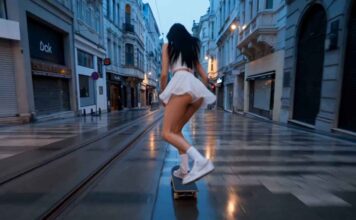
Viral Giant Woman in City Video Prompt 2026 (Copy Paste) GGVP36

0

If you have seen the trending “Giant Woman in City” videos on Instagram Reels or YouTube Shorts and want to create a similar video for your own channel, then you are in exactly the right place!

These days, it is the era of Text-to-Video AI. There are many powerful AI video generators available in the market right now—like Seedance 2.0, Kling 3.0, Runway ML, Google Veo 3, LTX 2.5, and Vidu AI—that can create cinematic videos just from the text you type. By using these tools, you can create amazing content for your faceless channel or meme page.

However, to make this specific viral video, we will use the best free AI tool: Seedance. Copy the prompt given below and generate your own viral video!

How to Generate the Video (Step-by-Step)

1. Go to the Website: First, visit
OpenArt.ai (Free AI Video Generator)
and sign in for free using your Google account. OpenArt mein Seedance 2.0, Kling 3.0, or
Google Veo 3 — Its free.

Select Text-to-Video: On the dashboard, click on the ‘Create’ or ‘Text to Video’ option.

Paste the Prompt: Copy the prompt provided below and paste it into the prompt box. (Note: You can change the colors or characters in the prompt if you want).

Choose Aspect Ratio: If you are making the video for Instagram Reels or YouTube Shorts, select the 9:16 (Portrait) ratio. If it is for standard YouTube videos, keep it at 16:9 (Landscape).

Generate: Click the ‘Generate’ button and wait 1-2 minutes. Your high-quality AI video is now ready to download!

The Copy-Paste Prompt

⭐ GADGET GYANI RECOMMENDED TOOL

🎬 OpenArt.ai — Free AI Video & Image Generator

To create this video, we’ll be using OpenArt.ai — an all-in-one AI creator studio where top models like Seedance 2.0, Kling 3.0, and Google Veo 3 are all available in one place, completely FREE! Text-to-Video, Image Generation, Lip-Sync, Motion Sync — everything you need is right here.

🚀 Try OpenArt.ai for Free →

✅ No Credit Card Required  |  ✅ Instant Sign-up with Google Account

(Copy the exact text below)

Low-angle cinematic wide shot of a towering, ultra-realistic giant woman with long flowing hair, wearing an elegant long coat and stylish sneakers, walking through a densely packed New York City street. She is hundreds of feet tall, with her head rising above the skyscrapers. With each step, the asphalt cracks and bursts into dust and debris under her immense weight. Tiny yellow taxis and pedestrians scatter in panic below her. In one moment, she gently picks up a miniature-looking taxi between her fingers to observe it, emphasizing her massive scale. A small helicopter flies past her shoulder, highlighting her gigantic presence. Bright natural daylight with realistic city shadows, ultra-detailed textures on skin and clothing, cinematic composition, fluid motion, 8K photorealism, epic scale and depth.

Gadget Gyani Pro Tip (For This Video)

To make this video look even more realistic, add extra details to the prompt like a “Dark Look” “real skin texture” “wind” and “shoes with mud on the upper.”

For the background music, make sure to use trending Phonk or Lo-Fi audio on Instagram. This will help push your video into algorithm
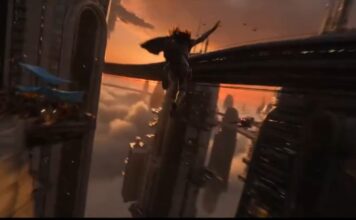
Viral GTA Vice City Video Prompt 2026 (Copy Paste) GGVP35

0

If you have seen the trending “GTA Vice City” videos on Instagram Reels or YouTube Shorts and want to create a similar video for your own channel, then you are in exactly the right place!

These days, it is the era of Text-to-Video AI. There are many powerful AI video generators available in the market right now—like Seedance 2.0, Kling 3.0, Runway ML, Google Veo 3, LTX 2.5, and Vidu AI—that can create cinematic videos just from the text you type. By using these tools, you can create amazing content for your faceless channel or meme page.

However, to make this specific viral video, we will use the best free AI tool: Seedance. Copy the prompt given below and generate your own viral video!

How to Generate the Video (Step-by-Step)

1. Go to the Website: First, visit
OpenArt.ai (Free AI Video Generator)
and sign in for free using your Google account. OpenArt mein Seedance 2.0, Kling 3.0, aur
Google Veo 3 — Its free.

Select Text-to-Video: On the dashboard, click on the ‘Create’ or ‘Text to Video’ option.

Paste the Prompt: Copy the prompt provided below and paste it into the prompt box. (Note: You can change the colors or characters in the prompt if you want).

Choose Aspect Ratio: If you are making the video for Instagram Reels or YouTube Shorts, select the 9:16 (Portrait) ratio. If it is for standard YouTube videos, keep it at 16:9 (Landscape).

Generate: Click the ‘Generate’ button and wait 1-2 minutes. Your high-quality AI video is now ready to download!

The Copy-Paste Prompt

⭐ GADGET GYANI RECOMMENDED TOOL

🎬 OpenArt.ai — Free AI Video & Image Generator

To create this video, we’ll be using OpenArt.ai — an all-in-one AI creator studio where top models like Seedance 2.0, Kling 3.0, and Google Veo 3 are all available in one place, completely FREE! Text-to-Video, Image Generation, Lip-Sync, Motion Sync — everything you need is right here.

🚀 Try OpenArt.ai for Free →

✅ No Credit Card Required  |  ✅ Instant Sign-up with Google Account

(Copy the exact text below)

Ultra-photorealistic cinematic gameplay sequence rendered in Unreal Engine 5 with full ray tracing and global illumination.

A rugged bearded male character (mid-20s to early-30s, Indian features, athletic build) wearing a fitted black t-shirt and dark jeans walks confidently toward the camera along a Miami-inspired coastal street at sunset. His arms have subtle tattoos, skin pores visible, natural facial micro-expressions, and physically accurate walking animation with proper weight shift.

Environment:
Art deco buildings with neon accents (pink, cyan, violet), palm trees swaying slightly in warm breeze, wet asphalt road with physically accurate reflections, passing cars with motion blur, scattered pedestrians with realistic idle animations. Street feels alive but not crowded.

Lighting:
Golden hour sun low on horizon casting long soft shadows, combined with neon emissive lighting from buildings. Volumetric light scattering, atmospheric haze, real-time reflections on wet surfaces, subtle lens bloom and glare.

Camera:
Third-person cinematic tracking shot, camera moving backward smoothly at matched walking speed, eye-level framing, 35mm lens equivalent, shallow depth of field (f/1.8 look), subtle handheld micro-movements for realism, no jitter.

Motion & Physics:
Natural gait cycle, cloth simulation on t-shirt, accurate foot-ground contact, reflections dynamically updating, vehicles moving with realistic acceleration, no clipping or sliding.

Rendering Style:
Next-gen AAA open-world game realism, 4K HDR, filmic tone mapping, high dynamic range, cinematic color grading (warm highlights, cool shadows), fine film grain.

UI Layer:
Minimal GTA-style HUD — mini-map bottom left, health/ammo bottom right, semi-transparent, clean and subtle.

Output:
Vertical 9:16, 6–8 seconds, smooth temporal consistency, no flicker, no frame warping.

Use these inline or as parameters depending on your interface:

temporal_consistency: high
physics_accuracy: high
lighting_model: ray_traced_global_illumination
reflection_quality: mirror_like
animation_quality: mocap_realistic
camera_stability: smooth_tracking
detail_level: ultra

NEGATIVE PROMPT

cartoon, stylized, low poly, blurry, flickering frames, warped faces, broken anatomy, sliding feet, floating objects, overexposed highlights, crushed blacks, noise artifacts, jitter camera, unrealistic motion, duplicate limbs

CINEMATIC VARIATIONS (HIGH VIRAL POTENTIAL)

Neon Night Hyperreal

Replace sunset with deep night, stronger neon dominance, purple-blue lighting, wet streets glowing, higher contrast, cinematic cyberpunk tone, more reflections and light bloom.

Rain Physics Mode

Add light rain with physically accurate droplets, ripple effects in puddles, water splashes on footsteps, dynamic reflections, moody darker tones.

Luxury Entry Shot

Character exits a luxury sports car (matte black), pauses, adjusts sleeve, then walks toward camera.

Gadget Gyani Pro Tip (For This Video)

To make this video look even more realistic, add extra details to the prompt like a “Dark Look” “real skin texture” “wind” and “shoes with mud on the upper.”

For the background music, make sure to use trending Phonk or Lo-Fi audio on Instagram. This will help push your video into algorithm
5,000FansLike
5,000FollowersFollow
4,000SubscribersSubscribe
10 Best Free AI Tools 2026 - Tested & Ranked for Indians

10 Best Free AI Tools 2026 Jo Har Indian Ke Kaam...

0
Pichle 6 mahine mein maine 25 se zyada AI tools test kiye hain. Kuch mein paisa barbaad hua, kuch ne time waste kiya, aur...

AI Updates